Visualizing Relationships II

Multiple Variables

STAT 80B - Data Visualization

Welcome Back!

Quick Recap from Last Time

We learned:

  • Scatter plots show relationships
  • Correlation measures strength
  • r ranges from -1 to +1
  • Always plot your data!

Today we’ll add:

  • Multiple variables at once
  • Solutions for too many points
  • Correlation matrices
  • Paired data visualizations

Part 1: Adding More Variables

The Challenge

Problem: We have more than 2 variables to show

Example: Penguin data has:

  • Body mass
  • Island
  • Species
  • Flipper length
  • Sex

Can we show more than just x and y?

The Challenge

Solution: Additional Aesthetic Mappings

We can map extra variables to:

Color

  • Great for categories (species, island, sex)
  • Can show quantitative (with gradient)
  • Our visual system is good at this!

Size

  • Best for quantitative variables
  • Creates a “bubble chart”
  • Be careful: harder to judge size differences

More Aesthetic Options

Shape

  • Best for categories (max 5-6 shapes)
  • Colorblind-friendly
  • Use with color for redundancy

Transparency

  • Shows overlapping points
  • Good for dense data
  • Makes patterns emerge

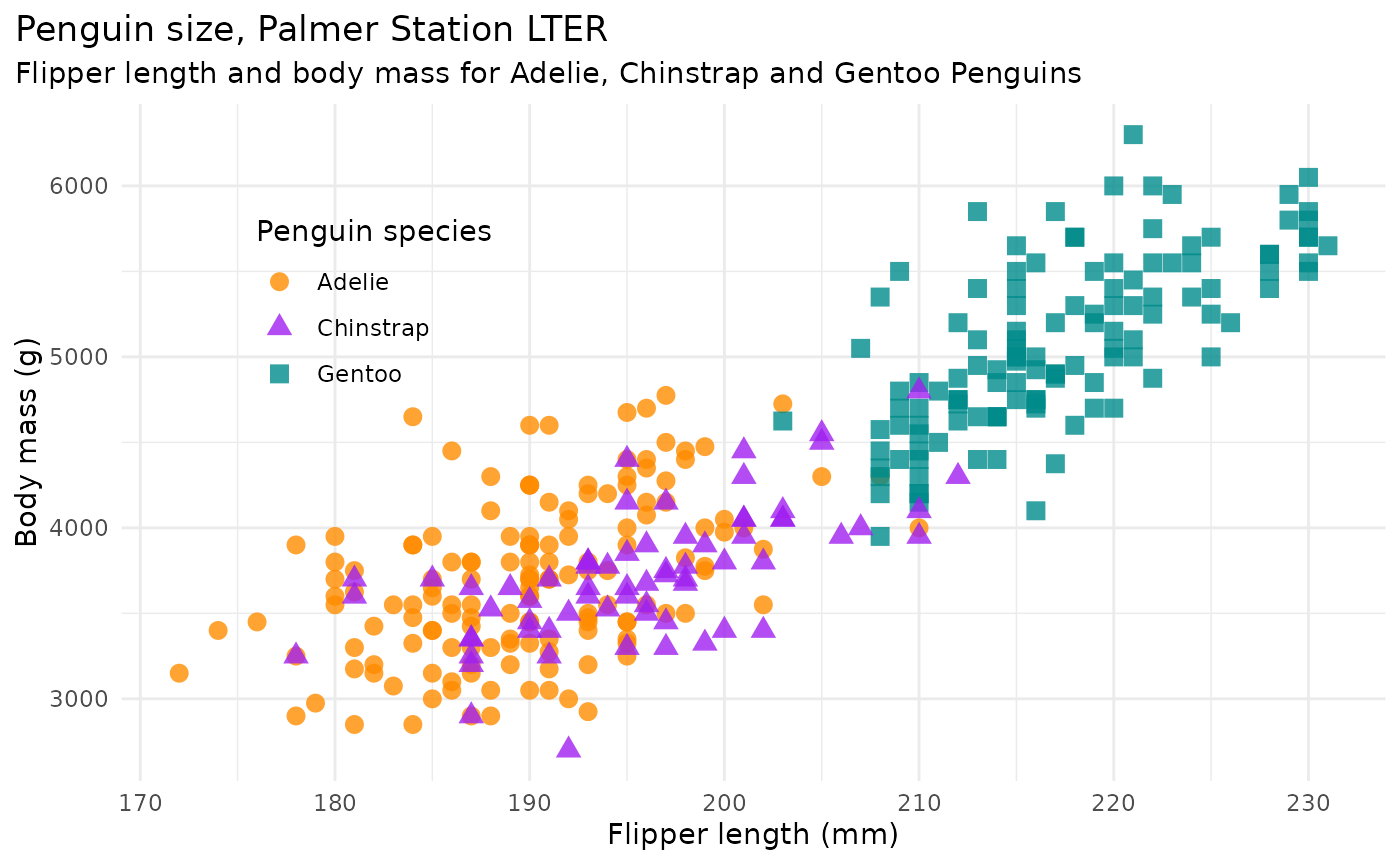
Real Example: Penguins with Color

Basic plot: Flipper length vs. body mass

Add color for species:

  • Adelie
  • Chinstrap
  • Gentoo

What this reveals:

  • Gentoo tend to be heavier
  • At same weight, Gentoo have longer flippers
  • Two-three sub-populations exist in the data!

🎯 Activity 1: Design a Multi-Variable Plot (10 min)

The Data: Pixar Films

public_response.csv

variable class description
film character Name of film.
rotten_tomatoes integer Score from the American review-aggregation website Rotten Tomatoes; scored out of 100.
metacritic integer Score from Metacritic where scores are weighted average of reviews; scored out of 100.
cinema_score character Score from market research firm CinemaScore; scored by grades A, B, C, D, and F.
critics_choice integer Score from Critics’ Choice Movie Awards presented by the American-Canadian Critics Choice Association (CCA); scored out of 100.

Your Task

Work in pairs to design a scatter plot:

  1. Choose your x-axis variable

  2. Choose your y-axis variable

  3. Choose one more variable to add via:

    • Color
    • Size
    • Shape
    • Or a combination!
  4. Sketch your plot on paper

  5. Explain: What relationship are you investigating? What will this combination reveal?

Share Your Designs on Ed Discussion

  • What variables did you choose?
  • Why did you map them the way you did?
  • What would this plot help us understand?

Key lesson: Not all combinations are equally good! Some mappings make sense, others create confusion.

Part 2: The Overplotting Problem

What is Overplotting?

Definition: When you have so many points that they overlap and obscure each other

Problems it causes:

  • Can’t see individual points
  • Can’t judge density
  • Patterns get hidden
  • True relationship becomes unclear

Solution 1: Transparency (Alpha)

Make points semi-transparent:

  • Overlapping points become darker
  • Reveals density patterns
  • Shows where data concentrates
  • Simple and effective!

In Tableau: Adjust the opacity slider

In R and Python: The parameter is called alpha on both languages.

Solution 2: Jittering

Add small random noise to point positions:

  • Separates overlapping points
  • Makes all points visible
  • Doesn’t change the overall pattern

When to Use Jittering

Good for: Discrete/rounded data (integer values)

Don’t use for: Data where exact position matters (precise measurements)

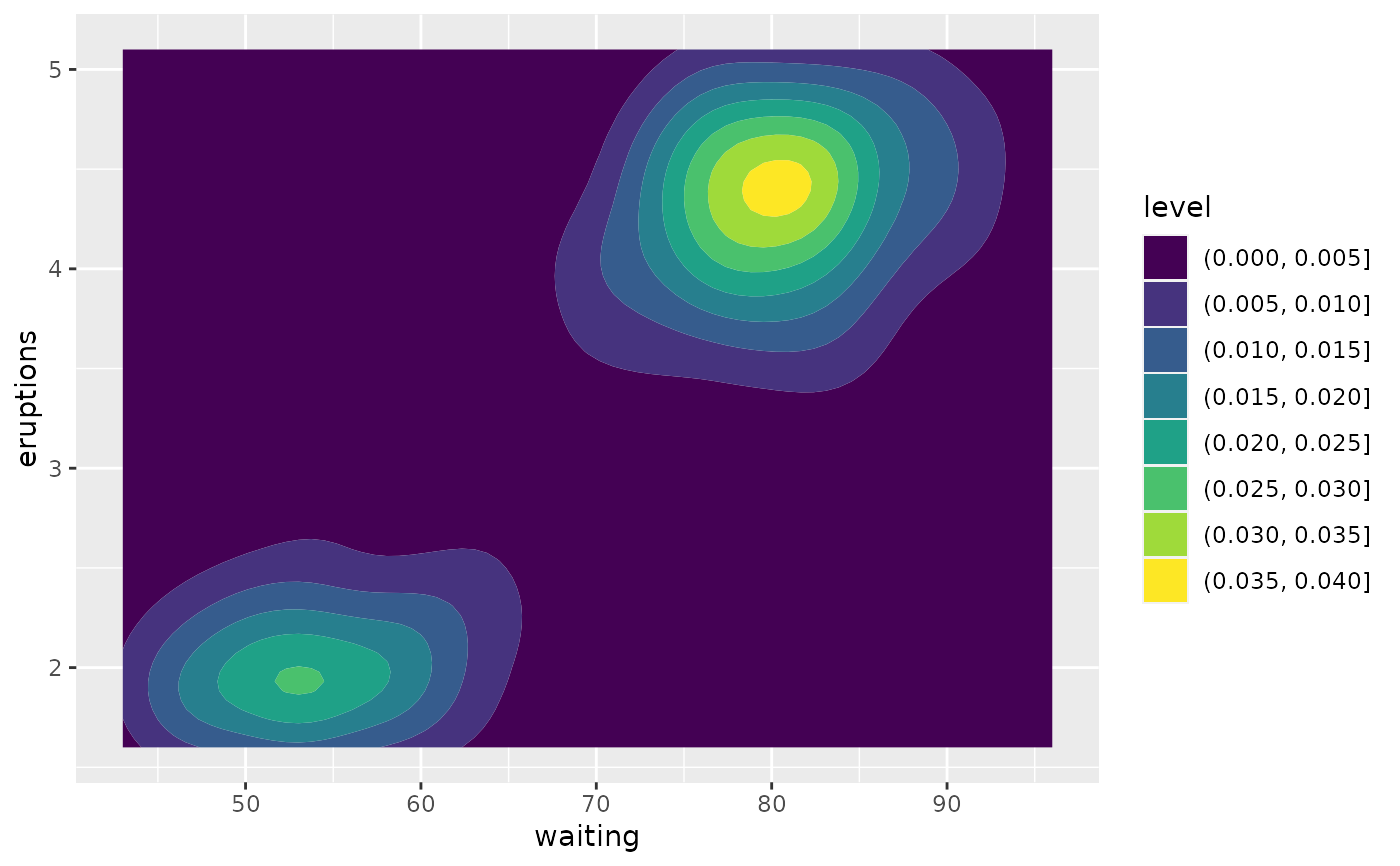
Solution 3: 2D Bins or Contours

Instead of showing individual points:

  • Divide plot into grid cells
  • Count points in each cell
  • Color cells by count (heatmap)
  • Or draw contour lines

Good for: Really large datasets (thousands of points)
🎯 Activity 2: Overplotting Challenge (8 min)

Diagnose and Solve

I’ll show you 3 problematic scatter plots.

For each one:

  1. Identify the problem (what makes it hard to read?)
  2. Propose a solution (transparency, jittering, binning?)
  3. Justify your choice (why is this the best approach?)

Work with your neighbor!

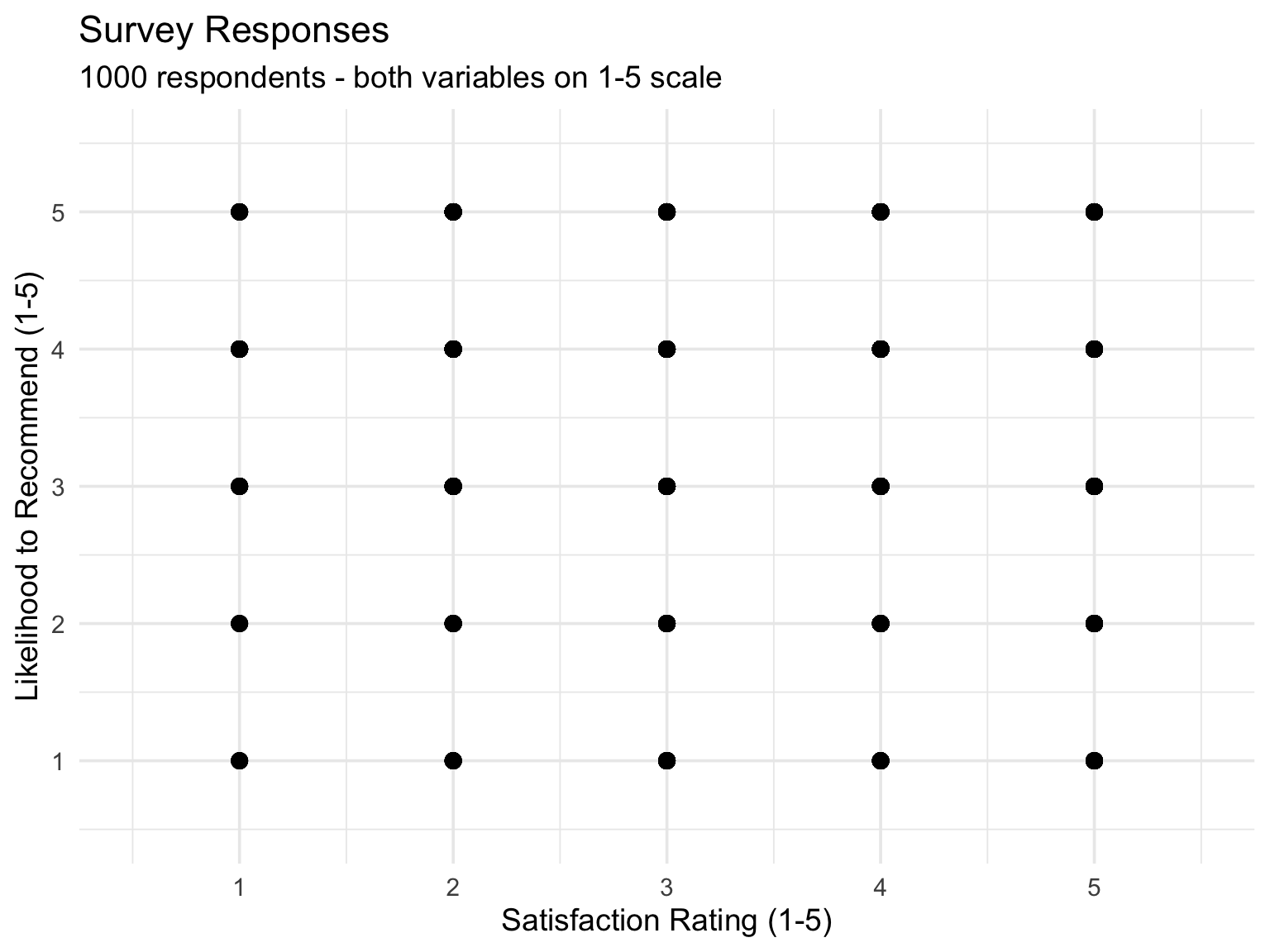
Problem Plot 1

Scenario: Survey data where people rated satisfaction (1-5 scale) and likelihood to recommend (1-5 scale). 1000 responses.

Issue: Since both variables are integers 1-5, many points overlap exactly at grid intersections.

What would you do?
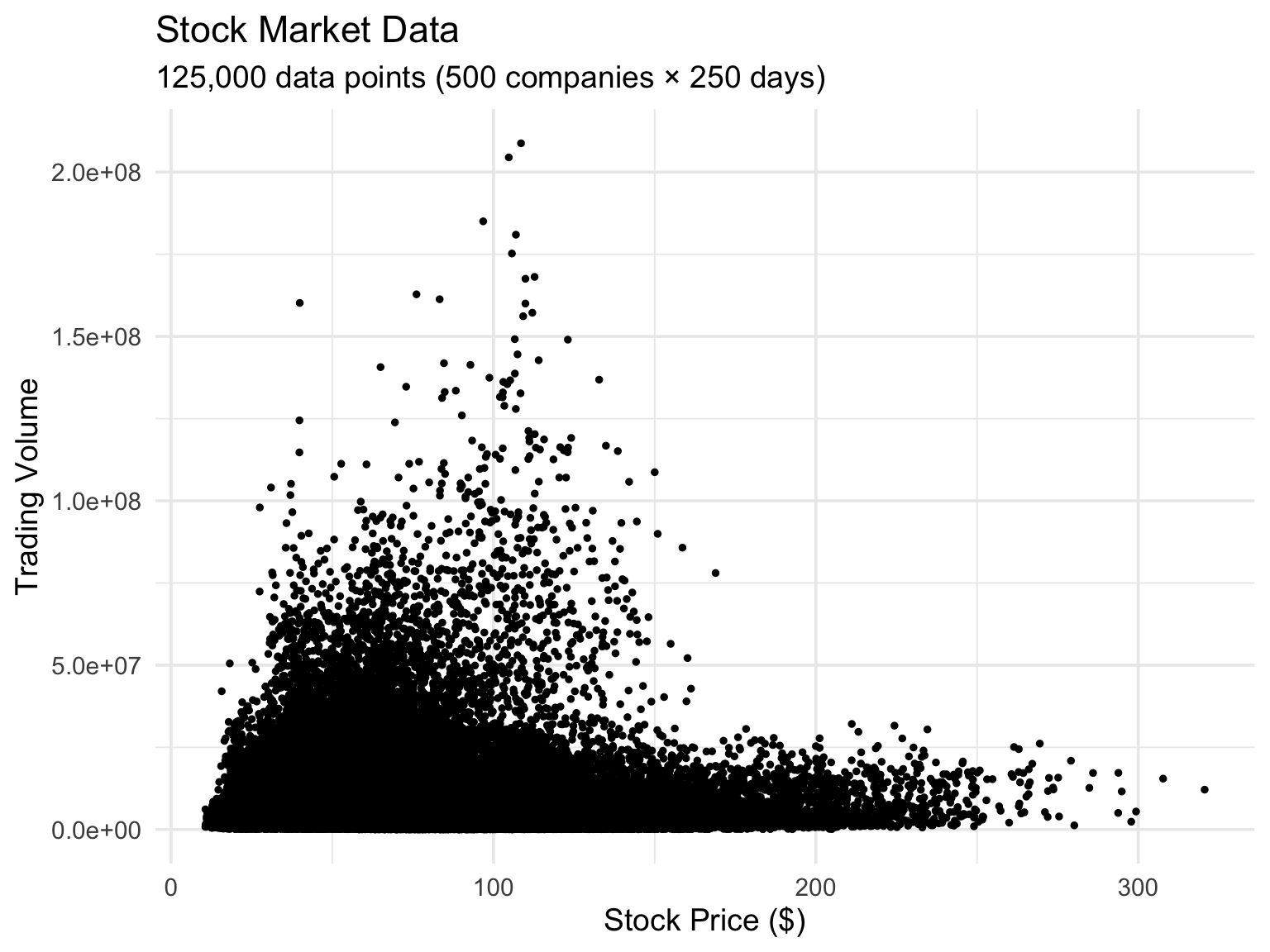
Problem Plot 2

Scenario: Daily stock prices (high precision decimals) for 500 companies over 1 year. Trying to show price vs. trading volume.

Issue: So many points (500 × 250 days = 125,000 points) that the plot is completely black in the middle.

What would you do?
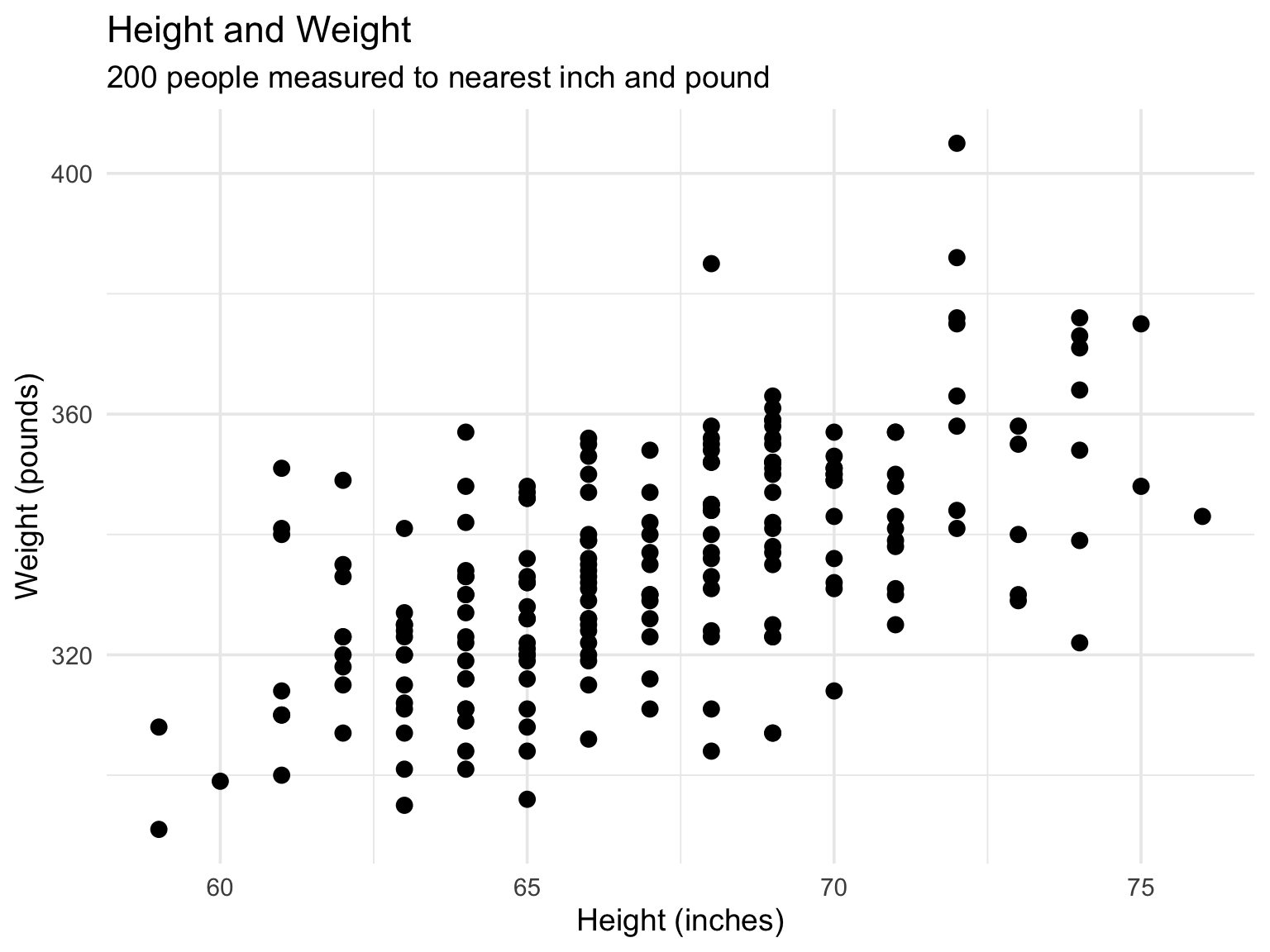
Problem Plot 3

Scenario: Height and weight measurements for 200 people, measured to the nearest inch and pound.

Issue: Multiple people have identical height/weight combinations, but we can only see one point.

What would you do?
Part 3: Correlation Matrices

The Challenge Grows

What if you have many quantitative variables?

  • Dataset with 5 variables = 10 possible pairs
  • Dataset with 10 variables = 45 possible pairs
  • Can’t draw 45 separate scatter plots!

Solution: Calculate and visualize all correlations at once

Correlation Matrix

A grid showing correlation between every pair of variables:

                  bill_length_mm bill_depth_mm flipper_length_mm body_mass_g
bill_length_mm         1.0000000    -0.2350529         0.6561813   0.5951098
bill_depth_mm         -0.2350529     1.0000000        -0.5838512  -0.4719156
flipper_length_mm      0.6561813    -0.5838512         1.0000000   0.8712018
body_mass_g            0.5951098    -0.4719156         0.8712018   1.0000000

Diagonal is always 1.00 (each variable perfectly correlates with itself)

Matrix is symmetric (correlation of A with B = correlation of B with A)

Visualizing Correlation: Correlograms

Instead of numbers, use visual encoding:

  • Color intensity = correlation strength
  • Positive = blue shades
  • Negative = red shades
  • Near zero = white/light

Sometimes add circle size for redundancy
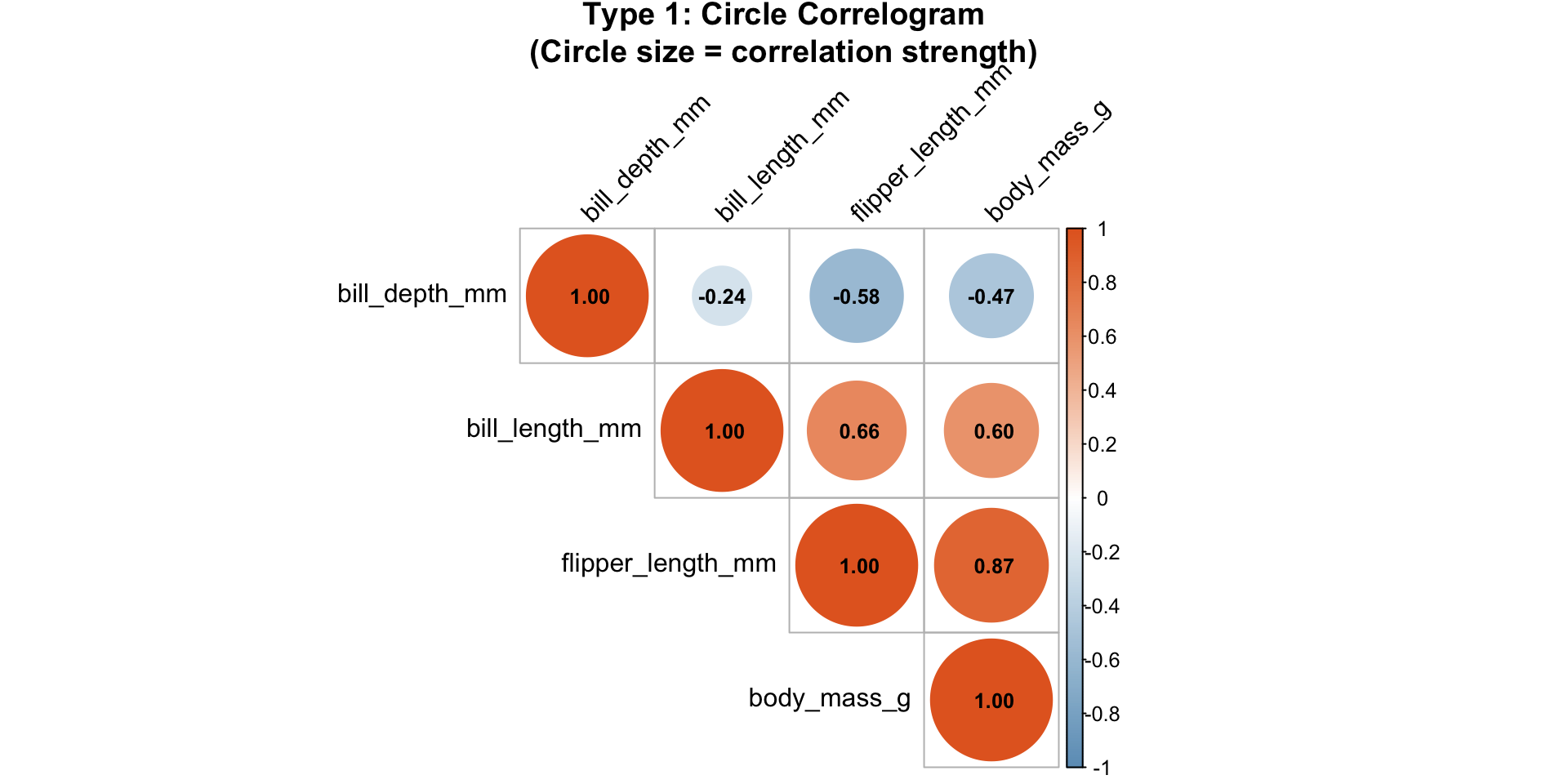
Reading a Correlogram

What to look for:

  • Strong correlations (dark colors)
  • Clusters of related variables
  • Unexpected relationships
  • Weak correlations you thought would be strong

In Tableau: https://www.thebricks.com/resources/guide-how-to-calculate-correlation-coefficient-in-tableau

🎯 Activity 3: Build a Correlation Matrix (12 min)

Manual Calculation Practice

Dataset: 5 students

Student Hours Studied Sleep (hrs) Coffee (cups) Score
A 2 8 1 65
B 5 7 2 78
C 8 6 3 92
D 3 8 1 70
E 6 5 4 85

Google Sheets

Your Task

Work in groups of 2-3:

  1. Calculate correlation between Study Hours and Score

    • Use the formula: =correl()
    • OR just estimate based on the pattern!
  2. Estimate other correlations:

    • Study Hours vs. Sleep
    • Study Hours vs. Coffee
    • Sleep vs. Coffee
    • Sleep vs. Score
    • Coffee vs. Score
  3. Draw a correlation matrix (table or heatmap)

  4. Interpret: What surprises you? What makes sense?

Discussion

  • Which variables are most strongly correlated?
  • Any negative correlations?
  • What stories might these correlations tell?
  • What can correlation NOT tell us here?

Part 4: Paired Data and Before/After

A Special Case

Paired data: Two measurements on the same individual/unit

Examples:

  • Blood pressure before and after medication
  • Test scores before and after tutoring
  • Plant height at week 1 and week 4
  • Same city’s temperature in 1980 vs. 2020

Key feature: The pairs matter! Order matters!

Visualizing Paired Data

Option 1: Scatter plot with reference line

  • Plot “before” on x-axis, “after” on y-axis
  • Add diagonal line where x = y
  • Points above line = improvement
  • Points below line = decline

Why this works: Equal units on both axes, easy to judge change

Visualizing Paired Data (cont’d)

Option 2: Slope graph

  • Before values on left axis
  • After values on right axis
  • Connect each pair with a line
  • Slope shows direction of change
  • Good for smaller datasets (<30 pairs)

Example: Blood Pressure Study

20 patients take medication for 3 months.

Scatter plot approach:

  • X-axis: BP before (mmHg)
  • Y-axis: BP after (mmHg)
  • Diagonal line: no change
  • Most points should be below line (BP decreased)

Reveals: Who improved most? Any non-responders?

🎯 Activity 4: Paired Data Visualization (15 min)

The Data: Plant Growth Experiment

10 plants measured at week 0 and week 3:

Plant Week 0 (cm) Week 3 (cm)
A 5 12
B 6 15
C 4 10
D 7 14
E 5 11
F 6 13
G 5 9
H 8 16
I 4 11
J 6 12

Your Task

Create BOTH visualizations:

  1. Scatter plot with reference line
    • X-axis: Week 0 height
    • Y-axis: Week 3 height
    • Draw diagonal y=x line
    • Plot all 10 plants
  2. Slope graph
    • Left axis: Week 0
    • Right axis: Week 3
    • Connect pairs with lines

Discussion

Then answer:

  • Which plant grew the most?
  • Which plant grew the least?
  • What is the average growth?
  • Which visualization do you prefer? Why?

And then think:

  • What did each visualization reveal?
  • When would you choose scatter plot vs. slope graph?
  • How would this change with 100 plants instead of 10?

Bringing It All Together

Today’s Toolkit

You now know how to:

  1. Add variables via color, size, shape
  2. Handle overplotting with transparency, jittering, or bins
  3. Visualize many relationships at once with correlation matrices . Visualize paired data appropriately

When to Use What?

Few variables, clear data: Standard scatter plot

Additional category: Add color or shape

Too many points: Add transparency or jitter

Many variables: Create correlation matrix

Before/after data: Scatter plot with reference line or slope graph

Remember These Points

  1. Multiple variables can be shown via color, size, shape
  2. Overplotting has solutions: transparency, jittering, bins
  3. Correlation matrices summarize many relationships at once
  4. Paired data needs special plots (reference lines, slope graphs)
  5. Always consider: What is your data type? How many points? What relationship matters?

Looking Ahead

Coming soon: Concept Map 2 assignment is due tomorrow

  • Topic: Choosing chart types
  • Create decision tree or concept map
  • Include: amounts, distributions, proportions, relationships
  • Due: Friday, Feb 13 at midnight

Make sure to complete it on time!

Questions?

Office hours: After class, let me know if you need time.

Keep practicing: The best way to learn data viz is to make lots of visualizations!